Once you have a session token, you launch the widget by sending the user from your platform to a Ripio URL with the token in the _to query parameter. There is nothing to install and no script to embed — the widget is a hosted page.

Widget URLs

The on-ramp and the off-ramp are separate entry points. Example:
Both entry points open on the same first screen: the user is asked for their email address, which is where sign-in begins. See Sign-in and terms.

Query parameters

Every parameter below is optional. They prefill or constrain the flow so the user has less to type.
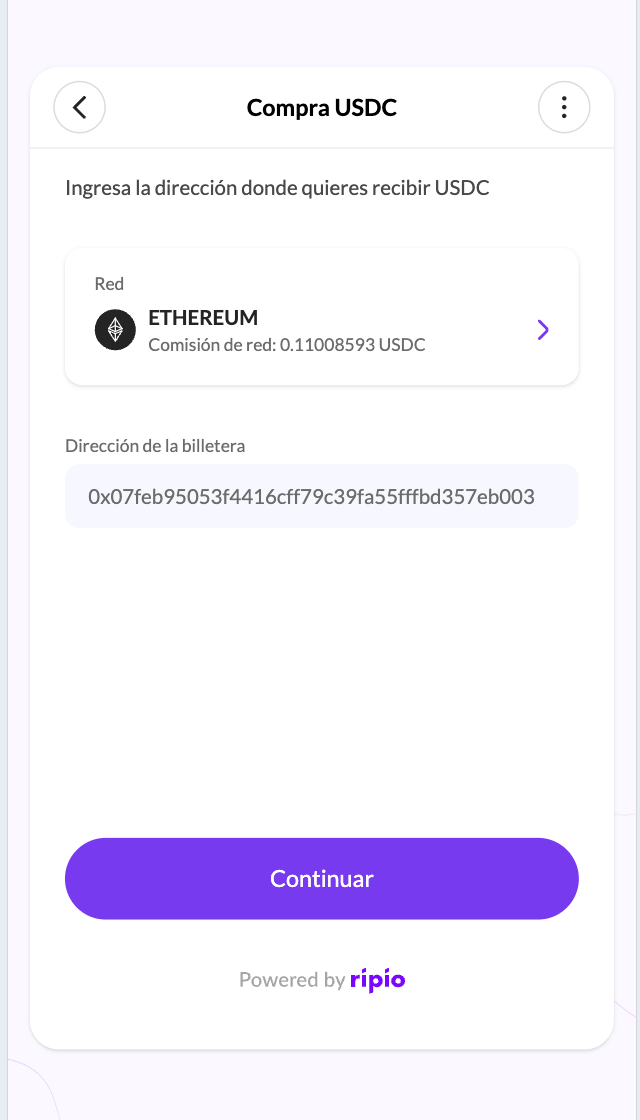
_addr is a prefill for users who have no address on file, not an override. If the end user already has a wallet address stored with Ripio, that address wins and the field is read-only. Sending a different _addr for a returning user has no effect.
The destination screen with a prefilled, non-editable wallet address
Prefills are cached for the lifetime of the session token, so a user who reloads the page mid-flow keeps them. Passing the same token again with different values will not reset a flow already in progress.

Tracking session parameter

The _tracking_session parameter can be used as follow:
Then, you will receive the tracking session in the webhooks as follows:
It is also echoed back to you on the redirect as session_id — see Returning to your app.

Reserved parameters

You will see three more parameters in your logs. Ripio generates them, and you should not construct them yourself.
_at travels in the URL fragment (#_at=…), not the query string, so the token never reaches server logs or a Referer header. If your edge, WAF or analytics layer rewrites or strips URL fragments on links your users open, the recovery link will not work.

Next steps

Returning to your app

Which screens redirect back to you, and exactly which parameters they append.

User flows

What the user does inside the widget, country by country.