

Create Sell and Pay transaction
Creates a new Sell and Pay transaction for converting cryptocurrency to fiat currency and paying a merchant via QR code. This endpoint automatically cancels any existing Sell and Pay transactions for the same customer. If all required fields are provided (customerId, externalRef, qrCode, paymentCurrency, depositCurrency, depositNetwork, and refundAddress), the transaction will be created with status PENDING. If any required fields are missing, the transaction will be created with status INCOMPLETE and must be completed using the update endpoint.
Country support
update endpoint before executing.Sandbox QR Codes — Argentina
For the sandbox environment, there are several QR codes available to simulate different transaction flows:valid-qr-code-with-amount
Use this QR code to simulate a successful payment flow with a random amount included in the QR code.
valid-qr-code-without-amount
Use this QR code to simulate a successful payment flow where the amount is not included in the QR code and must be specified separately.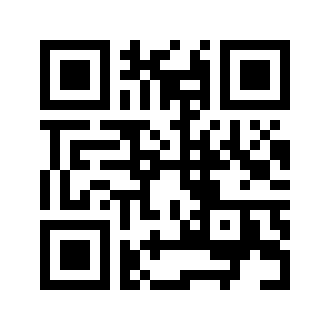
invalid-qr-code
Use this QR code to simulate an error flow when scanning an invalid or malformed QR code.
valid-qr-code-with-blocked-deposit
Use this QR code to simulate a scenario where the deposit destination is blocked or unavailable.
valid-qr-code-with-slippage
Use this QR code to simulate a payment flow that experiences slippage, where the final amount differs from the expected amount.
Sandbox QR Codes — Colombia (BREB-QR)
Use the strings below as theqrCode value in the sandbox environment:
Fixed-amount QR (COP 100)
Use this QR code to simulate a successful BREB-QR payment with a fixed amount already encoded in the QR.Open-amount QR
Use this QR code to simulate a successful BREB-QR payment without a pre-defined amount. The amount must be supplied via the update endpoint before executing.Authorizations
Access token obtained via /oauth2/token/. Use as Authorization: Bearer <access_token>.
Body
Unique identifier of the customer initiating the Sell and Pay transaction. Must be a valid customer registered in the system and associated with the account.
"b6cecc1f-c90d-424b-adaa-c82b780696c1"
External reference identifier for tracking purposes. This can be used to correlate the transaction with external systems or partner records.
250"sp-12345-2024"
QR code data containing the payment information for the merchant. This includes payment details such as recipient information and amount to be paid in fiat currency.
1"00020101021226360014BR.GOV.BCB.PIX0114+55119876543215204000053039865802BR5913Store Name XYZ6009SAO PAULO62070503***6304ABCD"
Fiat currency in which the payment will be made to the merchant. Must be one of the supported fiat currencies. Use ARS for Argentina QR payments and COP for Colombia BREB-QR payments.
ARS, COP "ARS"
Cryptocurrency that will be deposited by the customer (e.g., BTC, ETH, USDC). If not specified, the system may use default settings or require it during execution.
10"USDC"
Blockchain network for the cryptocurrency deposit (e.g., ETHEREUM, POLYGON, BITCOIN). Required when depositCurrency is provided. Must be a valid network supported for the specified deposit currency.
128"ETHEREUM"
Cryptocurrency address to which funds should be refunded if the transaction fails or is cancelled. Should be a valid address on the deposit network.
255"0x4e88BBeFF059BDDF5BF90ee0816E86eDf4214b32"
Response
Sell and Pay transaction successfully created
Unique identifier for the Sell and Pay transaction assigned by the B2B Service
"a3b2c1d0-1234-5678-90ab-cdef12345678"
Timestamp when the Sell and Pay transaction was created in ISO 8601 format
"2024-01-26T12:45:00.078230Z"
Timestamp when the transaction will expire if not completed in ISO 8601 format. After expiration, cryptocurrency deposits will not be processed.
"2024-01-26T13:45:00.078230Z"
Unique identifier of the customer who initiated the transaction
"b6cecc1f-c90d-424b-adaa-c82b780696c1"
Trade execution details. This will be null until the trade is executed and contains information about the cryptocurrency-to-fiat conversion.
Payment order details for the merchant payment. Contains information about the QR code payment and merchant details.
Payment amount in fiat currency to be paid to the merchant
"10000.50"
Amount of cryptocurrency required to complete the payment, calculated based on current exchange rates and fees
"10.25"
Fiat currency code for the payment (e.g., ARS, MXN, USD)
"ARS"
Cryptocurrency code for the deposit (e.g., BTC, ETH, USDC)
"USDC"
Blockchain network identifier for the cryptocurrency deposit (e.g., ETHEREUM, POLYGON, BITCOIN)
"ETHEREUM"
Cryptocurrency address where the customer should send the deposit. This is a unique address generated for this transaction.
"0x7a250d5630B4cF539739dF2C5dAcb4c659F2488D"
Information about the cryptocurrency deposit made by the customer. This will be null until a deposit is detected on the blockchain.
Current status of the Sell and Pay transaction. INCOMPLETE: missing required fields. PENDING: ready to execute. WAITING_DEPOSIT: executed and ready to receive crypto deposit. RECEIVED_DEPOSIT: crypto deposit detected on blockchain. CONFIRMED_DEPOSIT: crypto deposit confirmed. TRADE_COMPLETED: cryptocurrency successfully converted to fiat. QR_EXECUTION_PENDING: preparing payment to merchant. COMPLETED: payment successfully made to merchant. CANCELED: transaction cancelled. REFUND_PENDING: refund being processed. REFUNDED: funds refunded to customer.
INCOMPLETE, PENDING, WAITING_DEPOSIT, RECEIVED_DEPOSIT, CONFIRMED_DEPOSIT, TRADE_COMPLETED, QR_EXECUTION_PENDING, COMPLETED, CANCELED, REFUND_PENDING, REFUNDED "PENDING"
Cryptocurrency address for refunds in case of transaction failure or cancellation
Transaction hash for the refund transaction on the blockchain. Present when a refund has been processed.
"0xdef789abc456..."