> ## Documentation Index
> Fetch the complete documentation index at: https://docs.ripio.com/llms.txt
> Use this file to discover all available pages before exploring further.
# Buying crypto (on-ramp)
> The in-widget on-ramp flow by country and payment method: quote, payment instructions, PIX, request-to-pay, and where the user ends up.
The on-ramp turns the user's local currency into crypto delivered to a wallet address. The first half of the flow is the same everywhere; the second half depends on how they pay.
### The shared path
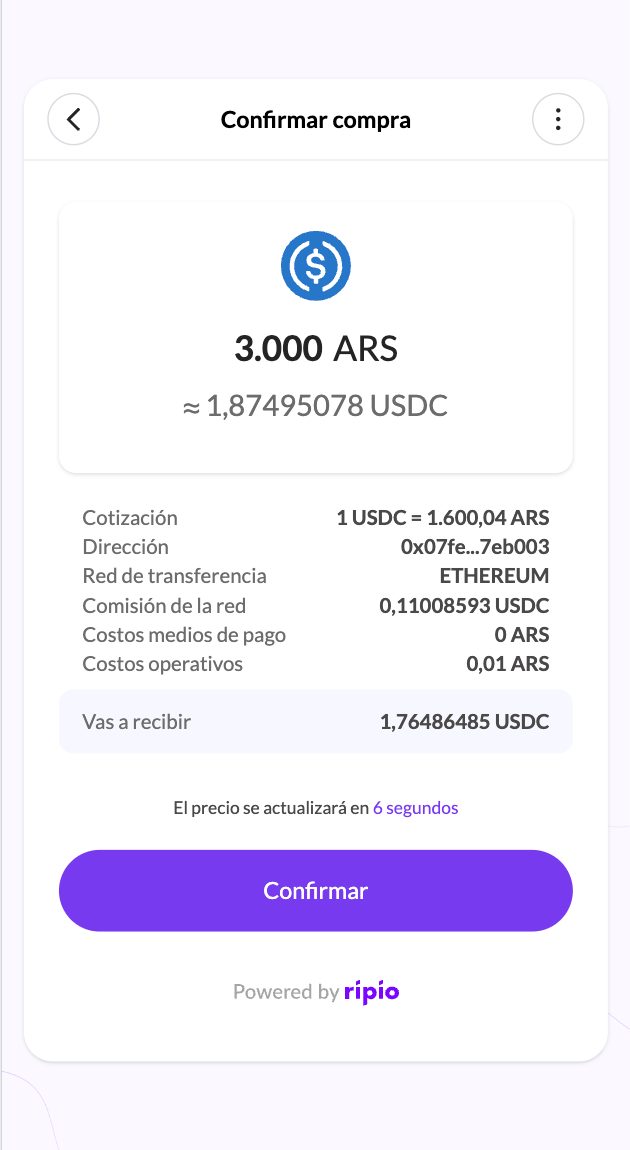
The widget quotes the operation and refreshes that quote on a timer, so the rate the user confirms is the rate they get. Minimums and maximums come from the [transaction limits](/ramps-api/transaction-limits/get-transaction-limits) that apply to your account.
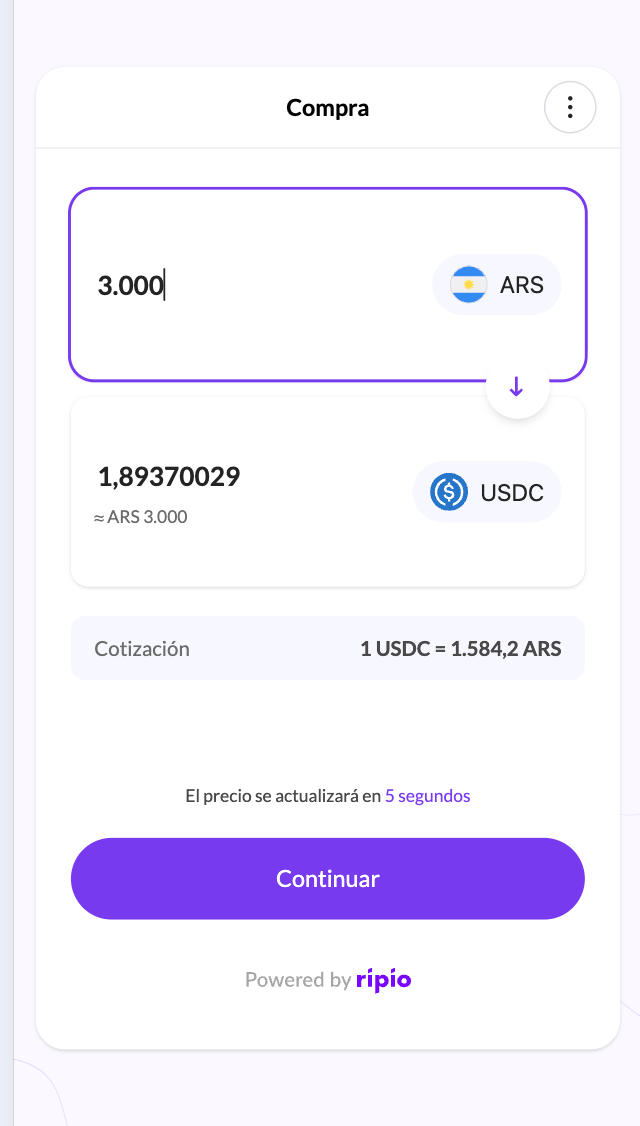 Limited to the networks enabled for your account.
Prefilled when you passed `_addr`, or when the user has an address on file. Otherwise they enter it.
Only the payment methods enabled for your account and country are offered. The confirmation screen breaks the cost down before the user commits.
Limited to the networks enabled for your account.
Prefilled when you passed `_addr`, or when the user has an address on file. Otherwise they enter it.
Only the payment methods enabled for your account and country are offered. The confirmation screen breaks the cost down before the user commits.
 ### Where the flow goes from there
| Country and method | What the user sees | How they come back |
| ------------------------------------------------------------------------- | ------------------------------------------------------------------------------------ | ------------------------------------------------------------------------------------------------------------------ |
| Argentina CVU, Mexico CLABE, Colombia BRE-B key | A screen with the account details to transfer to, which they pay from their own bank | Button back to you, **with** transaction parameters |
| Brazil PIX | A PIX key to copy, paid from their bank app | Confirmed screen, then the bare callback URL |
| Colombia Nequi request-to-pay | A push notification to approve in Nequi | Confirmed screen, then the bare callback URL |
| Argentina Mercado Pago, Colombia PSE and Bancolombia request-to-pay, card | They leave the widget for the provider's checkout | The provider returns them to Ripio, which re-enters the widget on the confirmed screen, then the bare callback URL |
Only the transfer-instruction screens append transaction parameters to your redirect URL. For Brazil, Nequi and every gateway flow, build your post-purchase experience on [On-Ramp Events](/ramps-api/webhooks/on-ramp-events) keyed by `external_ref`. See [Returning to your app](/ramps-api/widget/get-started/returning-to-your-app).
In Brazil the user's deposit account has to be provisioned before a PIX key can be issued. When it is not ready yet the widget keeps polling and shows a waiting state rather than failing the order.
### What your backend observes
The operation produces the ordinary on-ramp event chain, whichever way the user paid:
`ON-RAMP.DEPOSIT.RECEIVED` → `ON-RAMP.TRADE.COMPLETED` → `ON-RAMP.WITHDRAWAL.PROCESSING` → `ON-RAMP.WITHDRAWAL.COMPLETED`
If it fails instead, you get `ON-RAMP.ORDER.CANCELLED` with a `failureReason`, and the money is returned to the user — see [History and refunds](/ramps-api/widget/flows/history-and-refunds). Full payloads are in [On-Ramp Webhook Events](/ramps-api/webhooks/on-ramp-events).
### Where the flow goes from there
| Country and method | What the user sees | How they come back |
| ------------------------------------------------------------------------- | ------------------------------------------------------------------------------------ | ------------------------------------------------------------------------------------------------------------------ |
| Argentina CVU, Mexico CLABE, Colombia BRE-B key | A screen with the account details to transfer to, which they pay from their own bank | Button back to you, **with** transaction parameters |
| Brazil PIX | A PIX key to copy, paid from their bank app | Confirmed screen, then the bare callback URL |
| Colombia Nequi request-to-pay | A push notification to approve in Nequi | Confirmed screen, then the bare callback URL |
| Argentina Mercado Pago, Colombia PSE and Bancolombia request-to-pay, card | They leave the widget for the provider's checkout | The provider returns them to Ripio, which re-enters the widget on the confirmed screen, then the bare callback URL |
Only the transfer-instruction screens append transaction parameters to your redirect URL. For Brazil, Nequi and every gateway flow, build your post-purchase experience on [On-Ramp Events](/ramps-api/webhooks/on-ramp-events) keyed by `external_ref`. See [Returning to your app](/ramps-api/widget/get-started/returning-to-your-app).
In Brazil the user's deposit account has to be provisioned before a PIX key can be issued. When it is not ready yet the widget keeps polling and shows a waiting state rather than failing the order.
### What your backend observes
The operation produces the ordinary on-ramp event chain, whichever way the user paid:
`ON-RAMP.DEPOSIT.RECEIVED` → `ON-RAMP.TRADE.COMPLETED` → `ON-RAMP.WITHDRAWAL.PROCESSING` → `ON-RAMP.WITHDRAWAL.COMPLETED`
If it fails instead, you get `ON-RAMP.ORDER.CANCELLED` with a `failureReason`, and the money is returned to the user — see [History and refunds](/ramps-api/widget/flows/history-and-refunds). Full payloads are in [On-Ramp Webhook Events](/ramps-api/webhooks/on-ramp-events).