> ## Documentation Index
> Fetch the complete documentation index at: https://docs.ripio.com/llms.txt
> Use this file to discover all available pages before exploring further.
# Selling crypto (off-ramp)
> The in-widget off-ramp flow: destination account book, network and deposit, payout, and the QR versus auto-redirect behaviour.
The off-ramp turns the user's crypto into local currency paid into a bank account they nominate. The account they choose is the part that most often needs attention, so the widget keeps a reusable list of them.
### The flow
Quoted and refreshed the same way as the on-ramp.
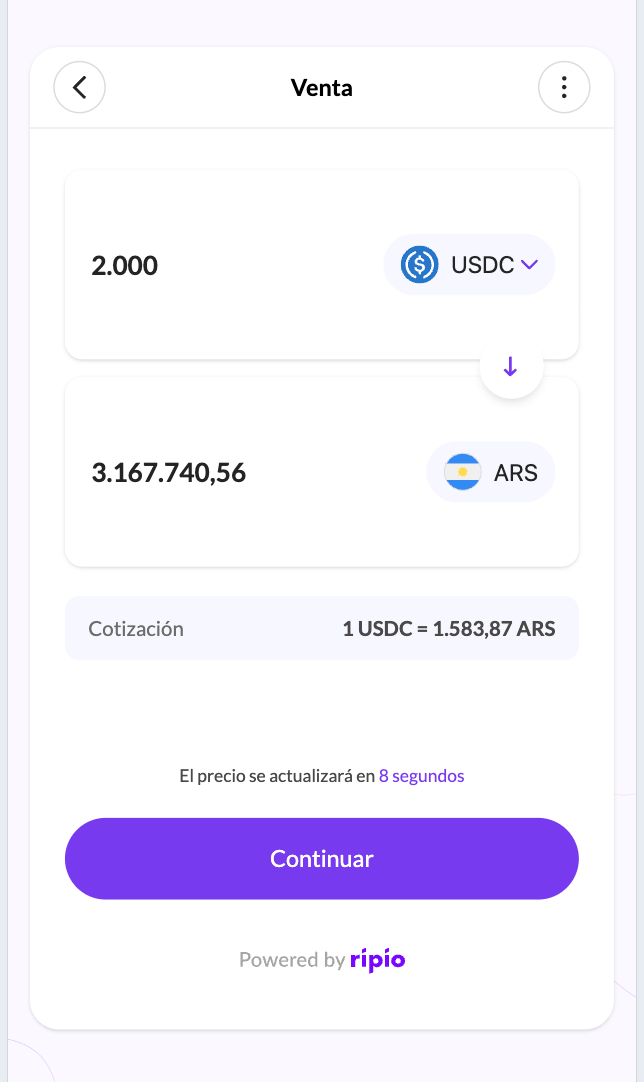 The user picks one of their saved destination accounts, or registers a new one.
The widget shows a deposit address for the chosen network.
Once the deposit confirms, the crypto is sold and the local currency is sent to the destination account.
### The destination account book
Saved accounts persist across sessions, so a returning user sells in a few taps.
The user picks one of their saved destination accounts, or registers a new one.
The widget shows a deposit address for the chosen network.
Once the deposit confirms, the crypto is sold and the local currency is sent to the destination account.
### The destination account book
Saved accounts persist across sessions, so a returning user sells in a few taps.
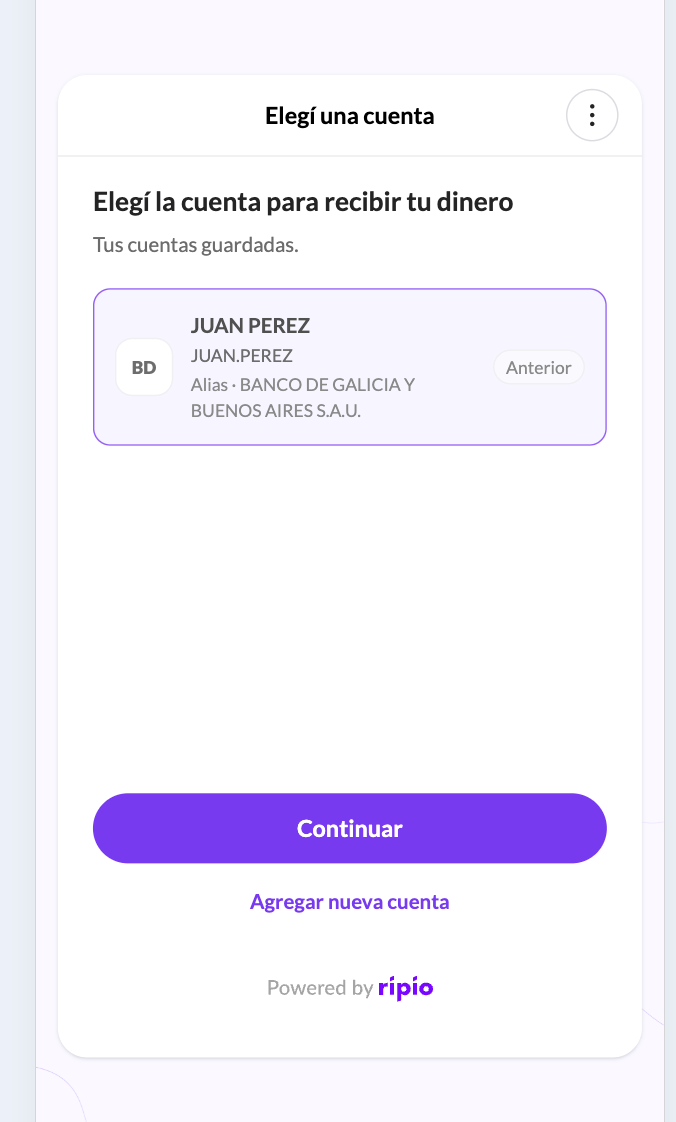 What a new account requires depends on the country:
| Country | What the user provides |
| --------- | --------------------------------------------- |
| Argentina | Alias, CBU or CVU |
| Mexico | CLABE, validated asynchronously with the bank |
| Colombia | A BRE-B key, or full bank account details |
| Brazil | A PIX key, plus the holder's name and tax ID |
Every account carries a status, and only an `enabled` account can receive a payout. The widget marks the others as unselectable and says why:
| Status | What it means for the user |
| ----------------------- | --------------------------------------------------------- |
| `enabled` | Ready to receive a payout |
| `unconfirmed` | Registered, waiting for the user to confirm it |
| `processing` | Being validated with the bank |
| `suspended` | Superseded by a newer account for the same payment method |
| `revalidation_required` | Needs to be checked again before it can be used |
| `disabled` | Not usable |
The authoritative rules — including the one-active-account-per-payment-method constraint and how a suspended account comes back — are in [Fiat account lifecycle](/ramps-api/fiat-accounts/lifecycle). The widget surfaces those rules; it does not change them.
Bank-side validation is asynchronous and can be slow. Colombia BRE-B in particular can take up to an hour to resolve. The widget waits about 5 minutes and then tells the user it will email them when the account is ready, rather than blocking the flow.
### How the user gets back to you
Decided by whether the QR deposit screen is enabled on your account:
* **Not enabled** — the widget redirects to your URL as soon as the sale is confirmed, with transaction parameters appended. The user never sees a deposit screen, so you are expected to send the crypto on their behalf.
* **Enabled** — the widget shows the deposit address and a QR code so the user sends the crypto themselves, plus a button back to you.
Ask your Ripio contact which of the two your account uses.
Both forms append the full parameter set. See [Returning to your app](/ramps-api/widget/get-started/returning-to-your-app).
### What your backend observes
`OFF-RAMP.DEPOSIT.RECEIVED` → `OFF-RAMP.TRADE.COMPLETED` → `OFF-RAMP.WITHDRAWAL.PROCESSING` → `OFF-RAMP.WITHDRAWAL.COMPLETED`
A payout that cannot be delivered arrives as `OFF-RAMP.ORDER.CANCELLED`, and what you can do about it depends on `refundable` — see [Recovering a rejected payout](/ramps-api/widget/flows/order-recovery). Full payloads are in [Off-Ramp Webhook Events](/ramps-api/webhooks/off-ramp-events).
What a new account requires depends on the country:
| Country | What the user provides |
| --------- | --------------------------------------------- |
| Argentina | Alias, CBU or CVU |
| Mexico | CLABE, validated asynchronously with the bank |
| Colombia | A BRE-B key, or full bank account details |
| Brazil | A PIX key, plus the holder's name and tax ID |
Every account carries a status, and only an `enabled` account can receive a payout. The widget marks the others as unselectable and says why:
| Status | What it means for the user |
| ----------------------- | --------------------------------------------------------- |
| `enabled` | Ready to receive a payout |
| `unconfirmed` | Registered, waiting for the user to confirm it |
| `processing` | Being validated with the bank |
| `suspended` | Superseded by a newer account for the same payment method |
| `revalidation_required` | Needs to be checked again before it can be used |
| `disabled` | Not usable |
The authoritative rules — including the one-active-account-per-payment-method constraint and how a suspended account comes back — are in [Fiat account lifecycle](/ramps-api/fiat-accounts/lifecycle). The widget surfaces those rules; it does not change them.
Bank-side validation is asynchronous and can be slow. Colombia BRE-B in particular can take up to an hour to resolve. The widget waits about 5 minutes and then tells the user it will email them when the account is ready, rather than blocking the flow.
### How the user gets back to you
Decided by whether the QR deposit screen is enabled on your account:
* **Not enabled** — the widget redirects to your URL as soon as the sale is confirmed, with transaction parameters appended. The user never sees a deposit screen, so you are expected to send the crypto on their behalf.
* **Enabled** — the widget shows the deposit address and a QR code so the user sends the crypto themselves, plus a button back to you.
Ask your Ripio contact which of the two your account uses.
Both forms append the full parameter set. See [Returning to your app](/ramps-api/widget/get-started/returning-to-your-app).
### What your backend observes
`OFF-RAMP.DEPOSIT.RECEIVED` → `OFF-RAMP.TRADE.COMPLETED` → `OFF-RAMP.WITHDRAWAL.PROCESSING` → `OFF-RAMP.WITHDRAWAL.COMPLETED`
A payout that cannot be delivered arrives as `OFF-RAMP.ORDER.CANCELLED`, and what you can do about it depends on `refundable` — see [Recovering a rejected payout](/ramps-api/widget/flows/order-recovery). Full payloads are in [Off-Ramp Webhook Events](/ramps-api/webhooks/off-ramp-events).