> ## Documentation Index
> Fetch the complete documentation index at: https://docs.ripio.com/llms.txt
> Use this file to discover all available pages before exploring further.
# History and refunds
> The in-widget transaction history, the refunds a user can claim from it, and how your backend follows a refund it did not request.
The widget can show users their past operations and let them claim money back when something went wrong — without opening a support ticket, and without going through you.
History and refunds are enabled together on your account — they are not separate switches. Turning the history off also **removes the user's ability to claim a refund from inside the widget**, because the refund is claimed from the history. Refunds additionally require the per-ramp refund opt-in on your account. Ask your Ripio contact for either.
### How the user gets there
The history is not a step in the flow — it is reached from a menu available on most screens, alongside the link to support. So a user can check on a past operation, or claim a refund for one, in the middle of doing something else.
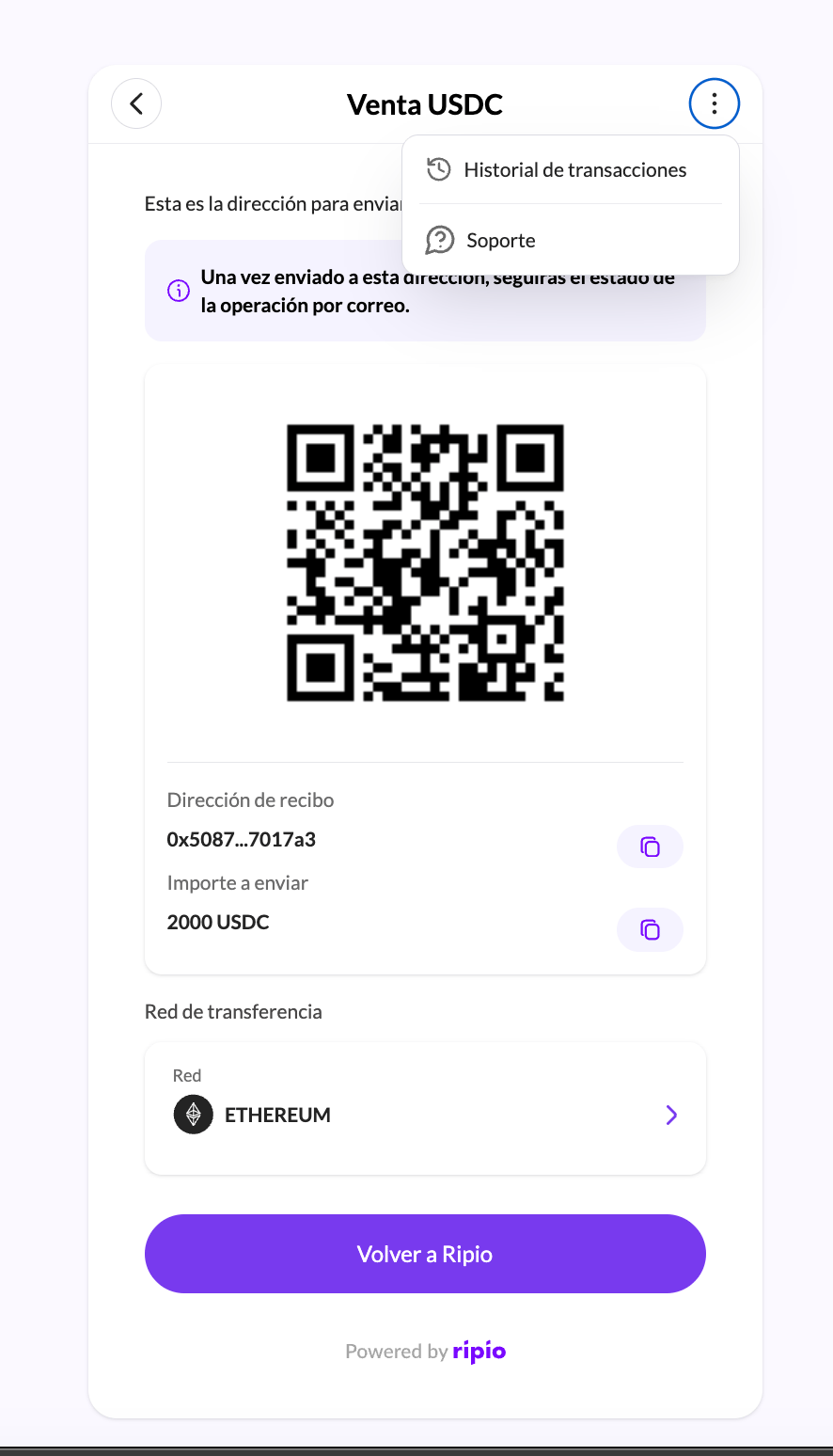 ### What the history shows
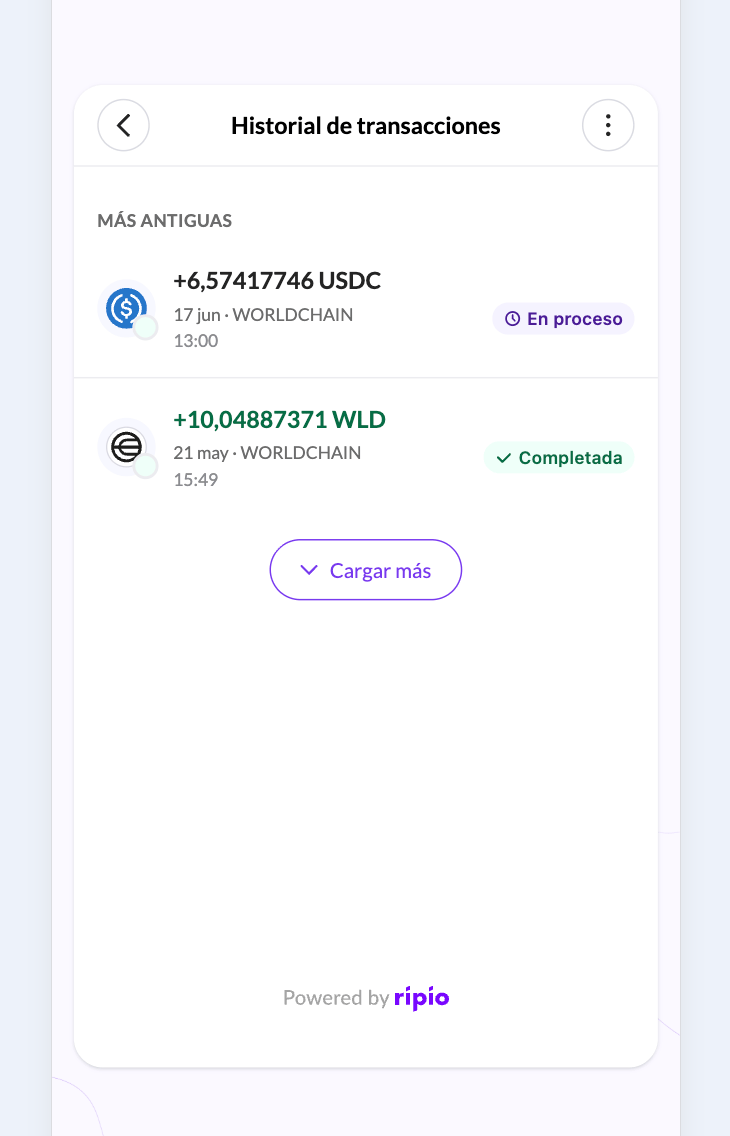
Operations are listed most recently updated first, on-ramp and off-ramp separately, paginated, with a detail view for each. Each row carries its status, so a user with one operation still settling and another already done sees both states at a glance.
### What the history shows
Operations are listed most recently updated first, on-ramp and off-ramp separately, paginated, with a detail view for each. Each row carries its status, so a user with one operation still settling and another already done sees both states at a glance.
 | Status | Meaning |
| ------------ | ------------------------------------------------ |
| `PENDING` | Registered, waiting on the user or on a provider |
| `PROCESSING` | Ripio is working on it |
| `COMPLETED` | Done |
| `CANCELLED` | Did not go through; `failureReason` says why |
| `REFUNDED` | The money was returned |
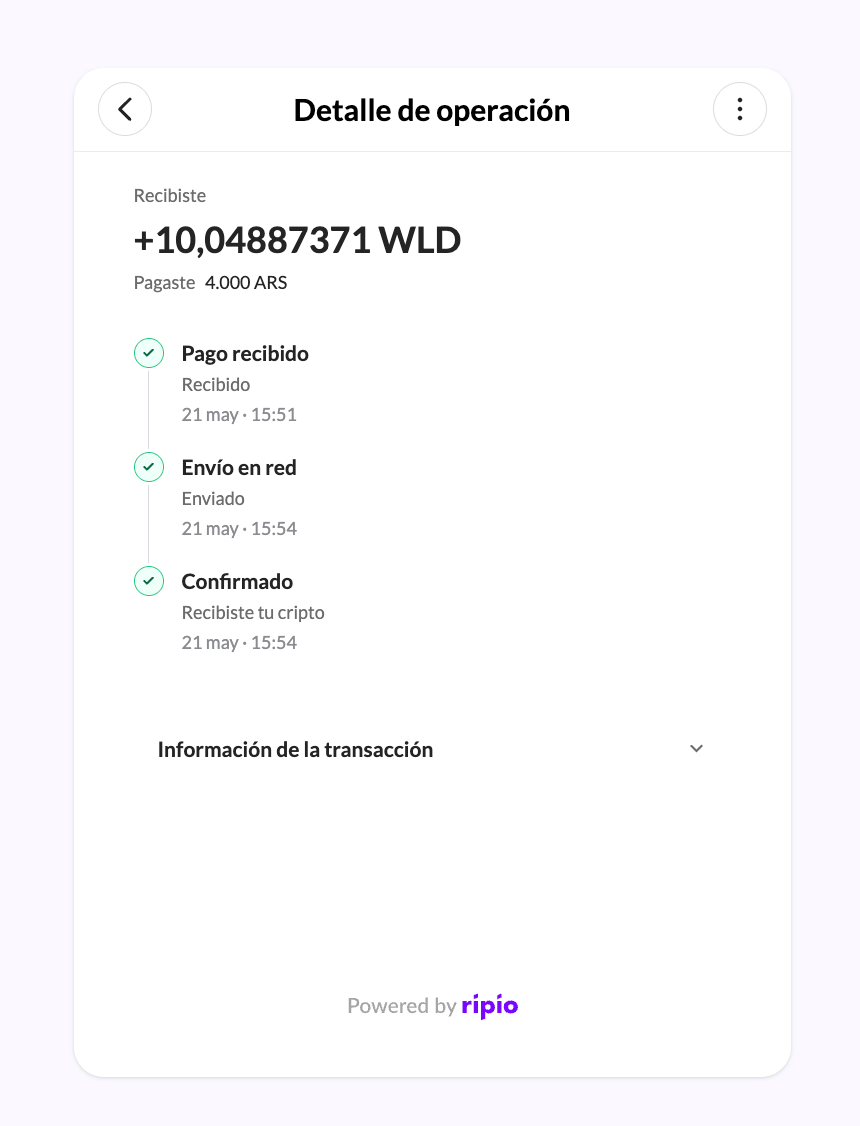
The detail view shows a three-milestone timeline — payment received, crypto sent, crypto delivered on the on-ramp; crypto received, funds sent, funds confirmed on the off-ramp — plus the on-chain hash once there is one, and where the money went, be that a wallet address, an alias, a CVU, a CLABE, a BRE-B key or a bank account.
| Status | Meaning |
| ------------ | ------------------------------------------------ |
| `PENDING` | Registered, waiting on the user or on a provider |
| `PROCESSING` | Ripio is working on it |
| `COMPLETED` | Done |
| `CANCELLED` | Did not go through; `failureReason` says why |
| `REFUNDED` | The money was returned |
The detail view shows a three-milestone timeline — payment received, crypto sent, crypto delivered on the on-ramp; crypto received, funds sent, funds confirmed on the off-ramp — plus the on-chain hash once there is one, and where the money went, be that a wallet address, an alias, a CVU, a CLABE, a BRE-B key or a bank account.
 ### What a user can claim
Three different things, each with its own rules:
| The user has | They can ask for | Notes |
| ------------------------------------------ | ----------------- | -------------------------------------------------------------------------------------------------------------------------------------------------------------------------------------------------------------------------- |
| A cancelled on-ramp order | The fiat back | A destination account is **required in Colombia** and **not accepted** in Argentina, Mexico or Brazil, where the money returns to where it came from. See [Request a Fiat Refund](/ramps-api/refunds/request-fiat-refund). |
| A fiat deposit that never matched an order | That deposit back | Money arrived but no operation was created against it. See [List Refundable Deposits](/ramps-api/refunds/list-refundable-deposits) and [Refund a Deposit](/ramps-api/refunds/refund-deposit). |
| An off-ramp order whose trade never ran | The crypto back | Only when `refundable` is true. Depending on the account, it returns to the origin address or to one the user types. See [Request a Crypto Refund](/ramps-api/refunds/request-crypto-refund). |
When an off-ramp order is **not** refundable, the crypto was already sold and the fiat payout is what failed. That case is not a refund — see [Recovering a rejected payout](/ramps-api/widget/flows/order-recovery).
### A refund is not instant
A claim is a request, not an execution. It is reviewed before any money moves, and while that review is open the refund reports as `PENDING`. The widget polls the history to follow it.
What your backend can and cannot rely on:
| Moment | Webhook |
| ------------------------ | ---------------------------------------------------------------------------------- |
| The refund is registered | none |
| It is approved | none |
| It is **rejected** | none |
| It **completes** | `ON-RAMP.ORDER.REFUNDED`, `ON-RAMP.DEPOSIT.REFUNDED`, or `OFF-RAMP.ORDER.REFUNDED` |
Only completion emits an event, on both ramps. A rejection never does. If you mirror refund state in your own interface, read `latestRefund` from the [customer's transactions](/ramps-api/transactions/list-customer-onramp-transactions) rather than waiting for an event that will not arrive.
The off-ramp completion event does not carry the hash of the returned crypto. Read `refundedTxnHash` on the order for that.
### Telling your refunds apart from the user's
`latestRefund.initiatedBy` says where a claim came from, which matters once both you and your users can start one. The values differ by ramp:
| Ramp | Possible values |
| ----------------- | -------------------------- |
| On-ramp (fiat) | `PARTNER`, `SYSTEM`, `OPS` |
| Off-ramp (crypto) | `PARTNER`, `WIDGET`, `OPS` |
`PARTNER` is a claim you made through the API, `WIDGET` one the end user made in the widget, `SYSTEM` one Ripio returned automatically, and `OPS` one Ripio's support team registered on the customer's behalf. Field-by-field semantics are in [Refunds](/ramps-api/refunds/overview).
### What a user can claim
Three different things, each with its own rules:
| The user has | They can ask for | Notes |
| ------------------------------------------ | ----------------- | -------------------------------------------------------------------------------------------------------------------------------------------------------------------------------------------------------------------------- |
| A cancelled on-ramp order | The fiat back | A destination account is **required in Colombia** and **not accepted** in Argentina, Mexico or Brazil, where the money returns to where it came from. See [Request a Fiat Refund](/ramps-api/refunds/request-fiat-refund). |
| A fiat deposit that never matched an order | That deposit back | Money arrived but no operation was created against it. See [List Refundable Deposits](/ramps-api/refunds/list-refundable-deposits) and [Refund a Deposit](/ramps-api/refunds/refund-deposit). |
| An off-ramp order whose trade never ran | The crypto back | Only when `refundable` is true. Depending on the account, it returns to the origin address or to one the user types. See [Request a Crypto Refund](/ramps-api/refunds/request-crypto-refund). |
When an off-ramp order is **not** refundable, the crypto was already sold and the fiat payout is what failed. That case is not a refund — see [Recovering a rejected payout](/ramps-api/widget/flows/order-recovery).
### A refund is not instant
A claim is a request, not an execution. It is reviewed before any money moves, and while that review is open the refund reports as `PENDING`. The widget polls the history to follow it.
What your backend can and cannot rely on:
| Moment | Webhook |
| ------------------------ | ---------------------------------------------------------------------------------- |
| The refund is registered | none |
| It is approved | none |
| It is **rejected** | none |
| It **completes** | `ON-RAMP.ORDER.REFUNDED`, `ON-RAMP.DEPOSIT.REFUNDED`, or `OFF-RAMP.ORDER.REFUNDED` |
Only completion emits an event, on both ramps. A rejection never does. If you mirror refund state in your own interface, read `latestRefund` from the [customer's transactions](/ramps-api/transactions/list-customer-onramp-transactions) rather than waiting for an event that will not arrive.
The off-ramp completion event does not carry the hash of the returned crypto. Read `refundedTxnHash` on the order for that.
### Telling your refunds apart from the user's
`latestRefund.initiatedBy` says where a claim came from, which matters once both you and your users can start one. The values differ by ramp:
| Ramp | Possible values |
| ----------------- | -------------------------- |
| On-ramp (fiat) | `PARTNER`, `SYSTEM`, `OPS` |
| Off-ramp (crypto) | `PARTNER`, `WIDGET`, `OPS` |
`PARTNER` is a claim you made through the API, `WIDGET` one the end user made in the widget, `SYSTEM` one Ripio returned automatically, and `OPS` one Ripio's support team registered on the customer's behalf. Field-by-field semantics are in [Refunds](/ramps-api/refunds/overview).