> ## Documentation Index
> Fetch the complete documentation index at: https://docs.ripio.com/llms.txt
> Use this file to discover all available pages before exploring further.
# Home
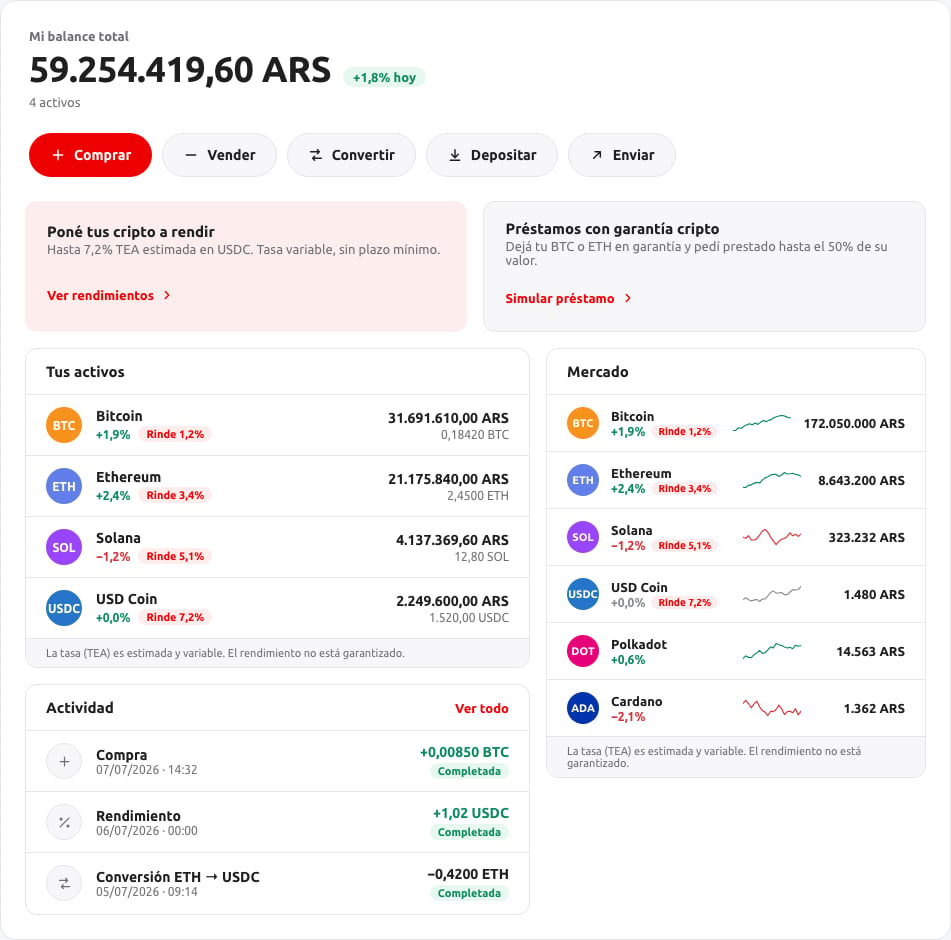
> The widget's landing screen: balance, holdings, activity and the market.
Home is the first screen a user sees after the widget finishes loading. It's organized into four sections.
 ### Balance and actions
The total balance valued in the account's fiat currency, its change, and the action buttons — Buy, Sell, Convert, Deposit, Send — filtered down to the operations the session has enabled (see [Overview](/crypto-as-a-service/widget/overview#what-depends-on-your-configuration)).
The balance's daily change reflects the change in **price** of the user's holdings, not a change in the size of their balance.
### Your assets
Each holding the user has, with its 24-hour change and, where the token is enrolled in a yield program, its APY. A zero balance isn't shown — this is a list of what the user owns, not a catalog of every asset available.
### Activity
The user's recent operations, each with its status and a link into its detail. See [Buy and sell](/crypto-as-a-service/widget/flows/buy-and-sell) for how an operation gets there.
### Market
Prices and short-term trends for the tokens available on the account, independent of what the user holds.
A `null` value in a change percentage or price means that figure genuinely isn't available right now — not zero. The widget hides the corresponding chip or shows an empty state rather than a misleading `0%`.
### Balance and actions
The total balance valued in the account's fiat currency, its change, and the action buttons — Buy, Sell, Convert, Deposit, Send — filtered down to the operations the session has enabled (see [Overview](/crypto-as-a-service/widget/overview#what-depends-on-your-configuration)).
The balance's daily change reflects the change in **price** of the user's holdings, not a change in the size of their balance.
### Your assets
Each holding the user has, with its 24-hour change and, where the token is enrolled in a yield program, its APY. A zero balance isn't shown — this is a list of what the user owns, not a catalog of every asset available.
### Activity
The user's recent operations, each with its status and a link into its detail. See [Buy and sell](/crypto-as-a-service/widget/flows/buy-and-sell) for how an operation gets there.
### Market
Prices and short-term trends for the tokens available on the account, independent of what the user holds.
A `null` value in a change percentage or price means that figure genuinely isn't available right now — not zero. The widget hides the corresponding chip or shows an empty state rather than a misleading `0%`.